Inventory without the usual ERP drag

Move from spreadsheets to a usable system in one afternoon.

ERP IMS gives small and mid-sized teams a practical inventory workspace: products, stock movements, warehouses, suppliers, purchase orders, and user roles, all in a clean interface that is easy to operate every day.
  • Clean workflows for warehouse, purchasing, and operations teams
  • Low-stock alerts and traceable inventory movements
  • Self-hosted deployment with minimal infrastructure overhead
1 command to boot the stack with Docker Compose
5 core modules already visible in the live interface
Admin + staff roles without enterprise-grade complexity
Designed for everyday use Fast to learn. Hard to break.
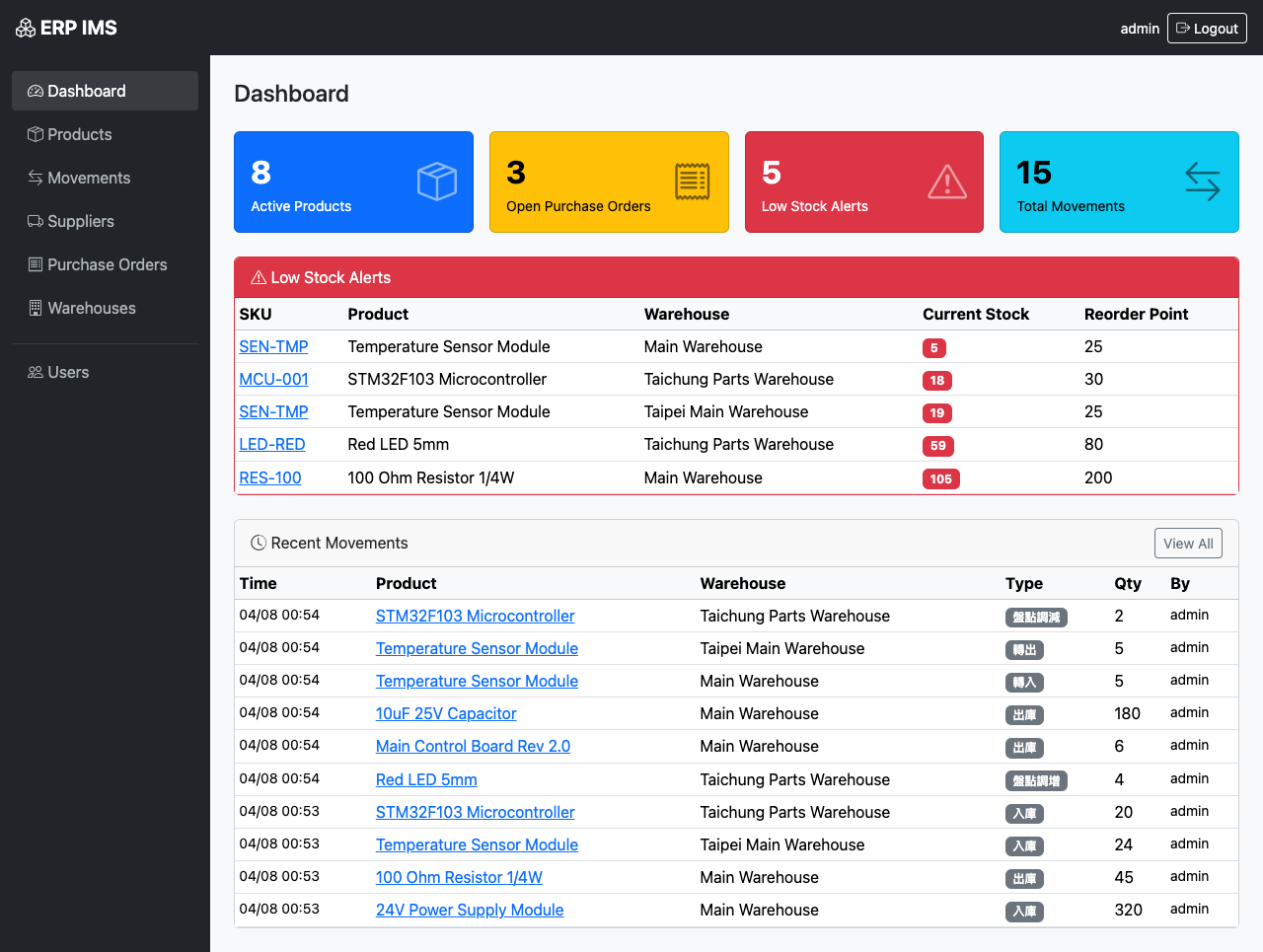
ERP IMS dashboard
Best fit Small ops teams replacing spreadsheets and chat-based stock tracking.
Deployment model Self-host first, simple enough to hand to one internal owner.
Full inventory workflow Products, warehouses, movements, suppliers, and purchase orders
Built for small teams No bloated setup. No enterprise maze.
Self-hosted by default You keep the data, access, and deployment model.

Quick answers

What ERP IMS is, who it is for, and why teams consider it.

What is ERP IMS?

A lightweight inventory and purchasing system for teams replacing spreadsheets, chat threads, and ad hoc stock tracking.

Who is it best for?

Small and mid-sized operations, warehouse, and purchasing teams that need control without a heavyweight ERP rollout.

Why does it stand out?

It combines self-hosting, fast onboarding, readable workflows, and a UI that is built for day-to-day operations instead of enterprise ceremony.

Who this is for

A better fit for teams that need control, not an ERP implementation project.

Warehouse + operations

People need inventory truth fast, not a training program.

Use ERP IMS when the team doing the work also needs to understand the software on day one.

Purchasing

Purchase orders should be visible and traceable.

Move from ad hoc email approvals to a simple lifecycle that shows what is draft, submitted, and received.

IT / internal builders

Deployable without standing up heavyweight infrastructure.

FastAPI, SQLite, and Docker Compose keep the footprint small enough for internal tools and small self-hosted stacks.

Why teams install it

Everything needed to run inventory operations, without the overhead.

Simple enough for daily use

Staff can find products, log movements, and follow purchase order status without digging through complex menus or ERP jargon.

Built-in operational control

Track low-stock risk, keep warehouse balances current, and preserve an audit trail for inbound, outbound, adjustment, and transfer events.

Deploy where you want

Run it as a lightweight web app with SQLite, or containerize it with Docker Compose for a straightforward self-hosted rollout.

Operational flow

The product story is already coherent from stock intake to user control.

01

Set up products and reorder points

Establish a usable catalog with SKU, unit cost, stock levels, and restock thresholds.

02

Track stock movement with context

Every inbound, outbound, transfer, and adjustment action leaves a readable trail.

03

Run supplier and PO workflows in one place

Keep purchasing visible instead of splitting the process across chat, sheets, and inbox threads.

04

Keep access simple and controlled

Support admins and staff with just enough permissions structure for a small internal app.

Product tour

Interfaces that tell users what to do next.

Dashboard

Open the app and immediately see low-stock alerts, open purchase orders, and recent activity.

Dashboard overview

Product catalog

Searchable product records with stock visibility across warehouses.
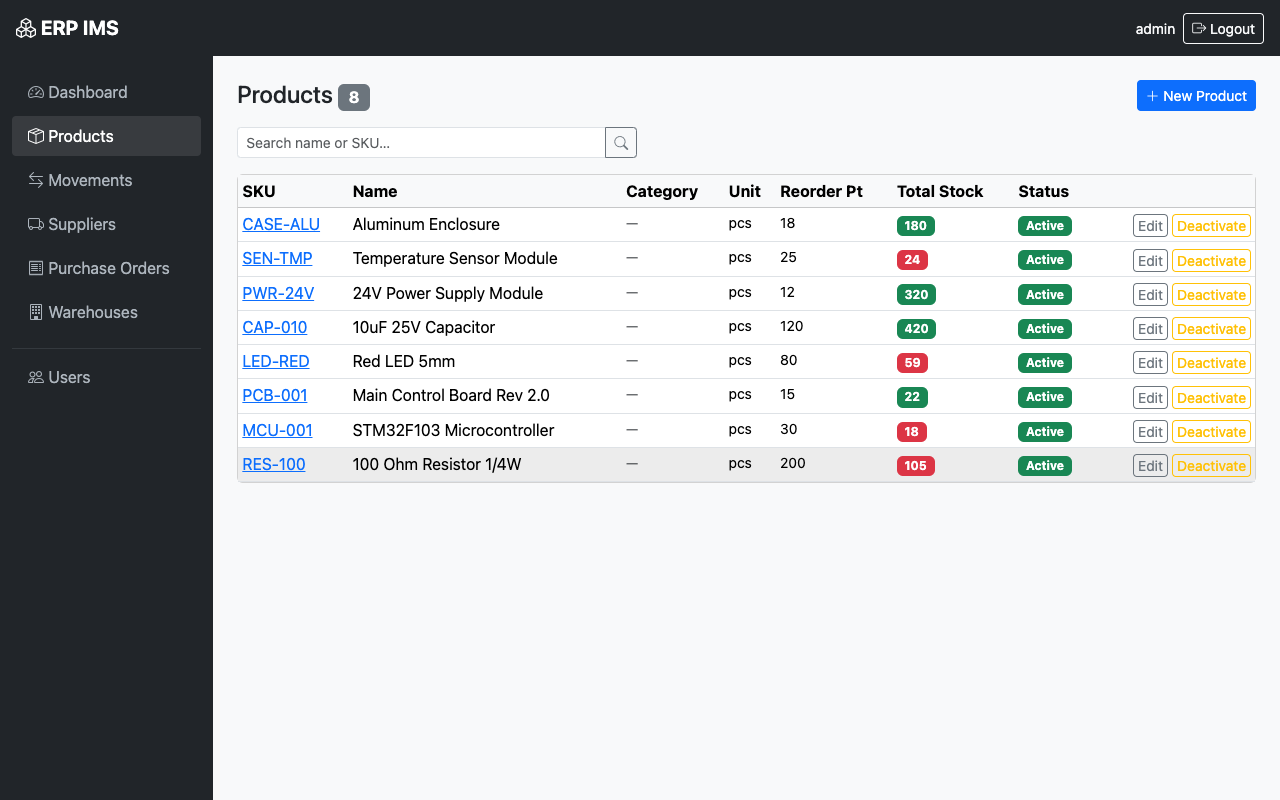
Product list

Movement history

Trace every stock change with a readable, filterable activity log.
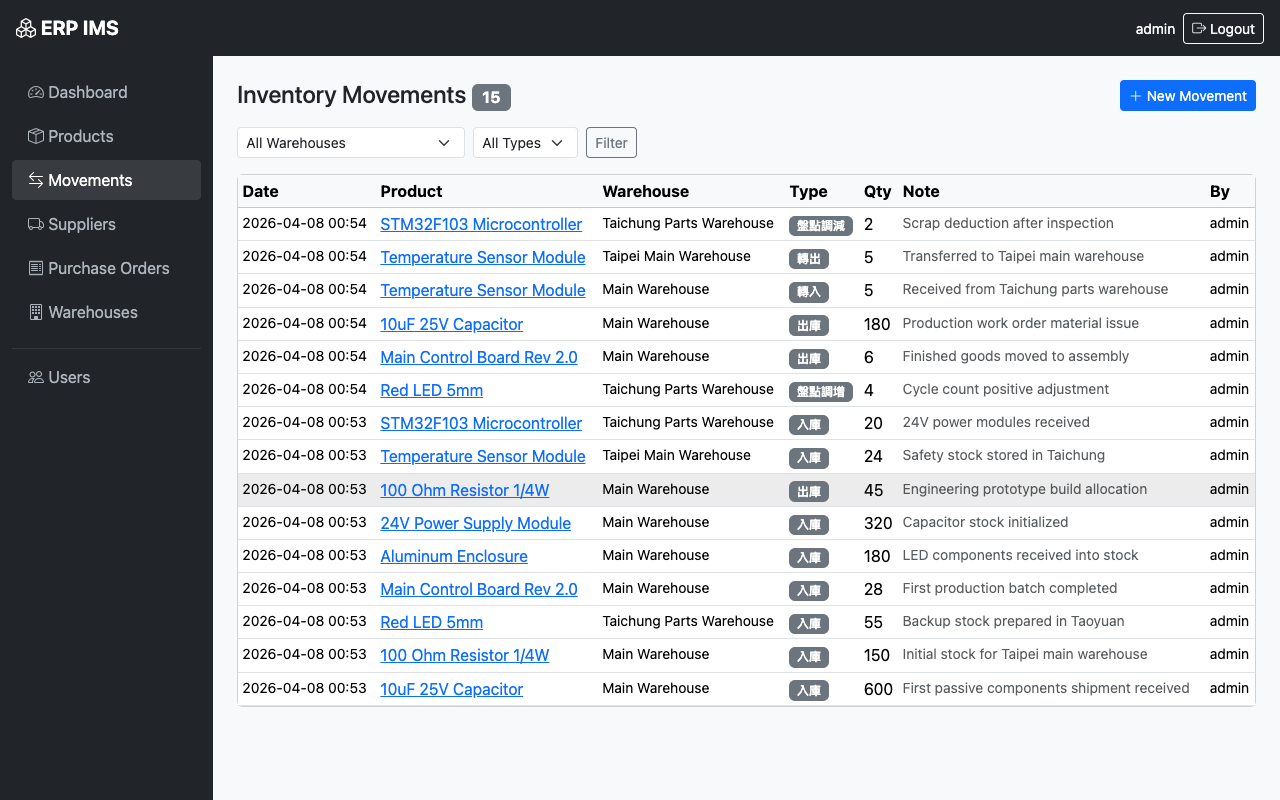
Inventory movement list

Purchase orders

Move from draft to submitted to received with a workflow teams can actually follow.
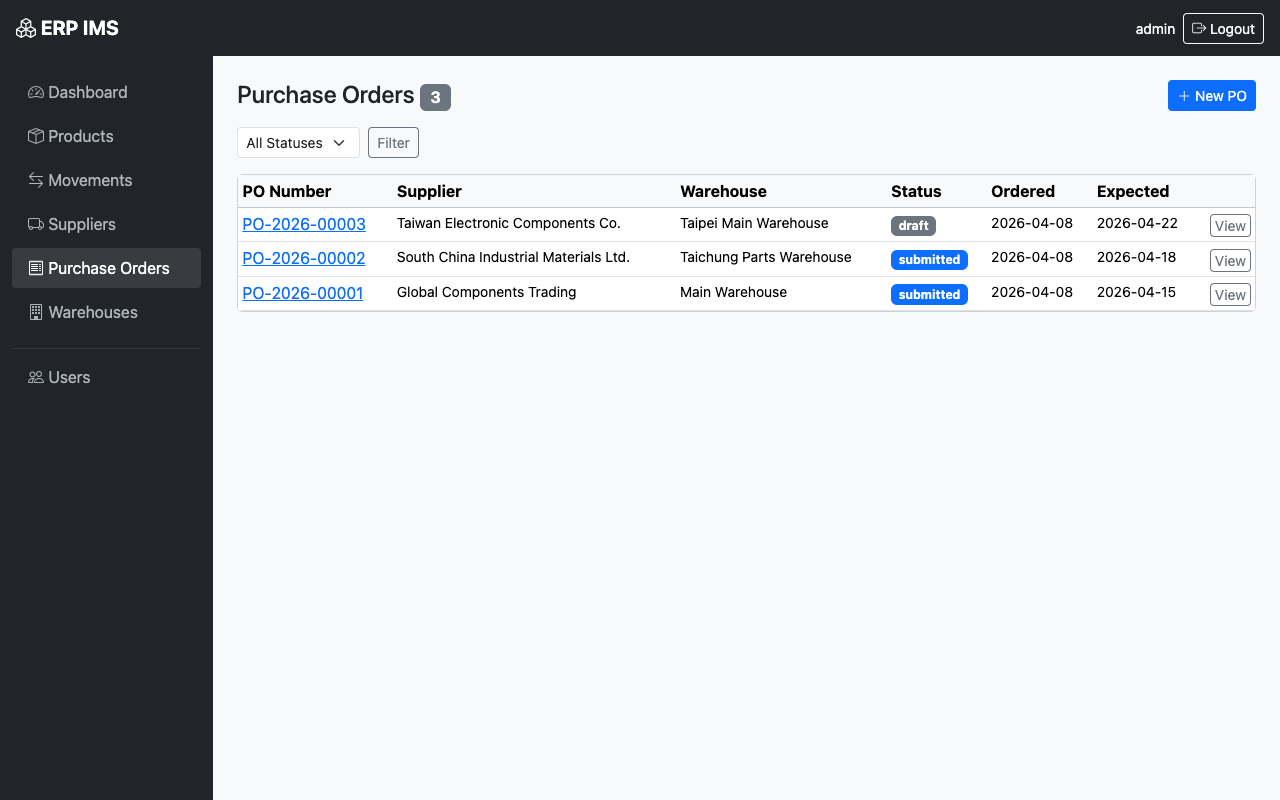
Purchase order list

User control

Support admin and staff roles without adding unnecessary access complexity.
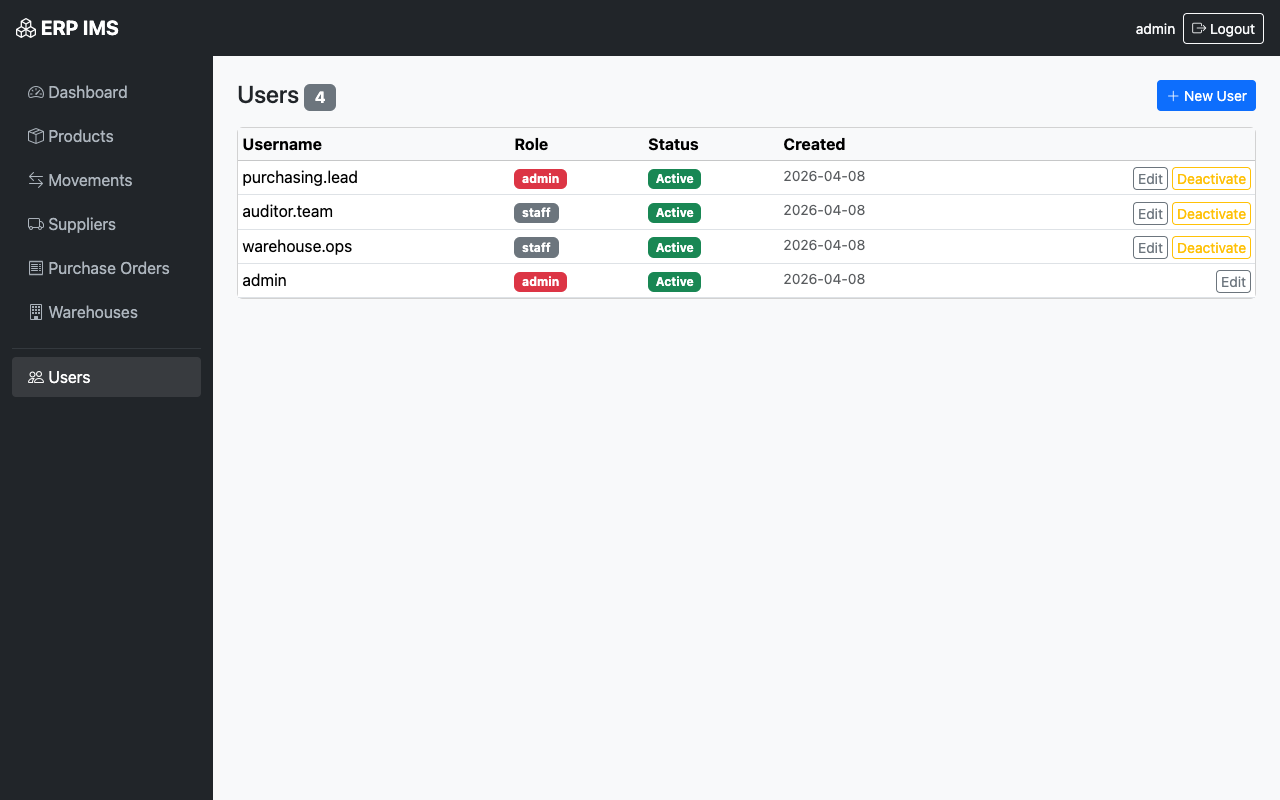
User management

Operational fit

Strong enough for real work, light enough to adopt quickly.

What teams get

  • Product CRUD with SKU, unit cost, and reorder point tracking
  • Multi-warehouse stock levels and movement history
  • Supplier and purchase order workflows in one place
  • Role-based access for admins and staff

Why it feels easier

  • Pages are task-oriented instead of module-heavy
  • Core actions are explicit and close to the data they affect
  • Default deployment path is simple enough for small infra teams
  • The UI reads like operations software, not accounting software

Why this page matters

The value proposition is strongest when compared to the current alternative.

What teams usually have now

  • Spreadsheet stock counts that drift out of date
  • Purchase tracking split across email and chat
  • No clear movement history when discrepancies appear
  • Too much process living in one operator’s head

What ERP IMS replaces it with

  • One inventory workspace with current warehouse balances
  • Purchase order status visible inside the same system
  • Readable audit trail for stock changes and operators
  • A system small teams can actually keep using

Deployment

Install it with a single command, then log in and start operating.

docker compose up --build

ERP IMS ships well for self-hosted environments. The default Compose setup runs the web app on port 8000 and stores SQLite data in a persistent Docker volume.

Default login: admin / admin@12345
Change the secrets and admin password before production use.

Runs well for evaluation on one host with persistent SQLite storage.
Good fit for internal tools, lab environments, and low-overhead operations teams.
Production hardening still requires secret rotation, backup policy, and access review.

FAQ

Questions buyers and internal adopters will ask before trying it.

Is this meant for huge enterprises?

No. The current story is strongest for small and mid-sized teams that want practical inventory control without a large ERP rollout.

Can I self-host it?

Yes. The page already positions Docker Compose and self-hosting as the default path, which is one of the clearest differentiators in the product story.

What does the current product cover?

Products, stock movements, warehouses, suppliers, purchase orders, dashboard visibility, and basic role-based access are all represented in the UI shown here.

What should a serious team verify next?

Authentication hardening, backup and restore, deployment docs, and reporting depth. Those are the items that separate a strong demo from a confident rollout.

Next step

Review the product screens, run the stack locally, and decide if this replaces your current spreadsheet workflow.

This version now tells a clearer story: what ERP IMS is, who it is for, what it replaces, how it deploys, and why a small team can adopt it without a long implementation cycle.